Accept MTN MoMo and Orange Money on Your Website
In Cameroon, many people pay with a phone before they pay with a card. MTN Mobile Money (MoMo) and Orange Money are the two names most customers know. If your website only accepts bank cards, you lose buyers who have money on their phone and no card.
This guide explains the options for adding mobile money to your website, what you need before you start, how a good checkout works and how to test it. The same ideas apply in other countries that use mobile money.
Why mobile money belongs on your website
Customers trust what they already use. A buyer who pays for airtime and sends money to family on MoMo or Orange Money feels safe paying you the same way. A familiar button also removes the fear of typing card details into a site they do not know.
It helps you too. Payments arrive in your account without you chasing a transfer slip, and each payment links to an order automatically.
Your options
There are two main ways to take mobile money online.
Option 1: Connect to each operator
You apply to MTN and to Orange as a merchant, and your developer connects the website to each one. You deal with the operator directly. The cost is more paperwork, a separate approval for each network and two integrations to maintain.
Option 2: Use a payment aggregator
An aggregator is a company that connects to several mobile money networks and often to cards as well. You sign one agreement, and your website connects once. Customers pick their network at checkout.
For most small businesses, this is the easier path. Compare each provider on the networks it covers, its fees, how fast it pays you and the quality of its support.
| Question | Direct to operators | Aggregator |
|---|---|---|
| Agreements to sign | One per network | One |
| Integration work | One per network | One |
| Cards available | No | Often yes |
| Best for | High volume sellers | Most small businesses |
Fees and settlement times change, so ask each provider for its current terms in writing before you decide.
What you need before you start
- A registered business or a clear business identity. Operators and aggregators usually ask for documents.
- A bank account or mobile money wallet for settlement.
- A website with a checkout, or a custom system that can create orders.
- Secure hosting with an SSL certificate, so the page shows a padlock.
- A clear refund and delivery policy, because providers often ask to see it.
How the checkout should work
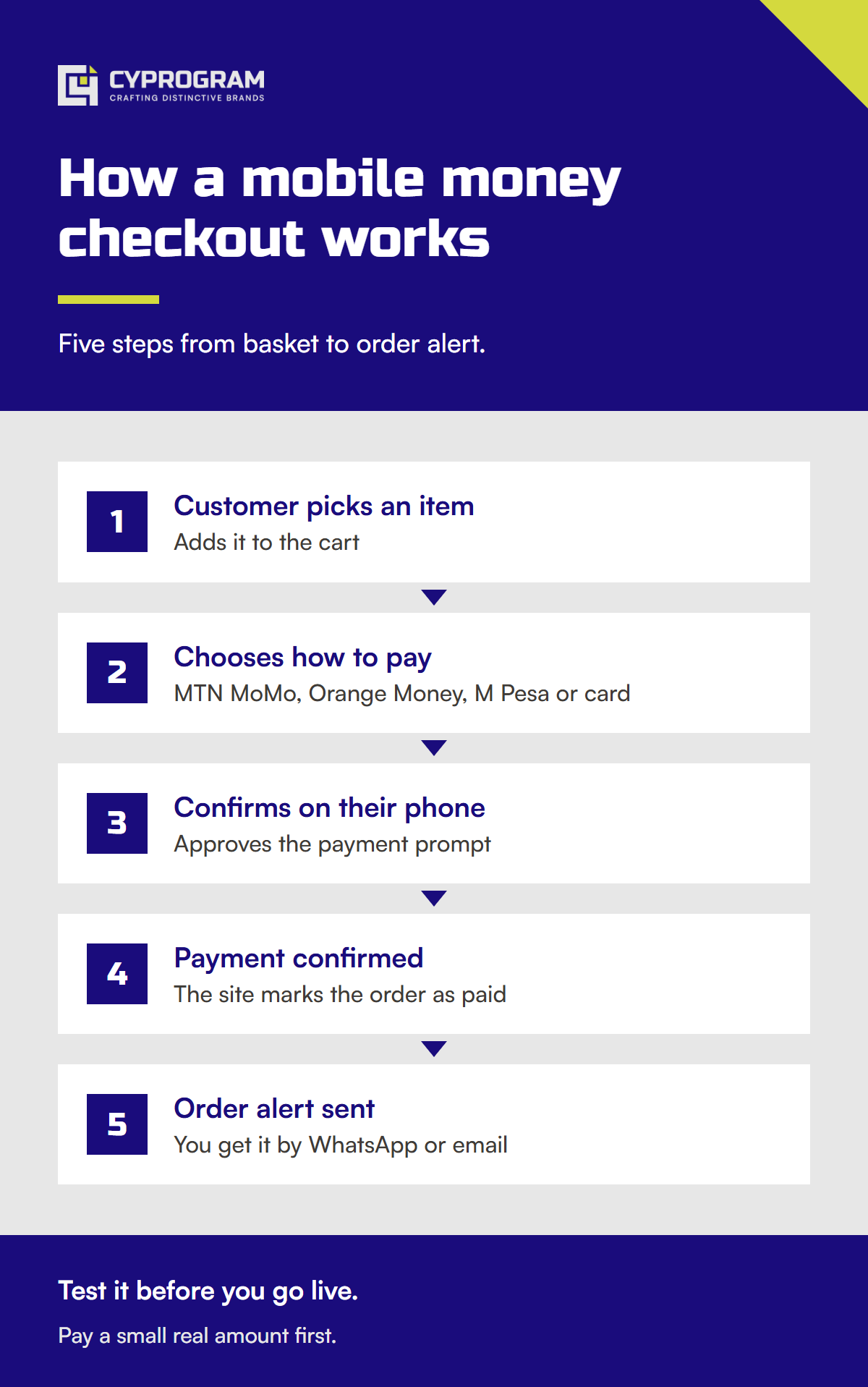
Mobile money checkout differs from a card form. The customer approves the payment on their phone, so your page needs to guide them through that moment.
- The customer reviews the cart and sees the total in local currency.
- They choose MTN MoMo or Orange Money.
- They enter the phone number that holds the money. Check the format and the country code.
- Your site sends the request to the provider.
- The customer receives a prompt on their phone and enters their PIN to approve.
- Your page shows a waiting message. It must tell them to check their phone.
- The provider confirms the payment to your server.
- The customer sees a success page and receives a receipt by email or WhatsApp.
Checkout details that matter
- Show the price in local currency. Do not make customers convert.
- Explain in one line what will happen: “You will get a prompt on your phone.”
- Do not mark an order paid because the customer clicked a button. Mark it paid only when your server receives confirmation from the provider.
- Handle failure. A customer may have low balance, enter the wrong PIN or miss the prompt. Offer a clear retry.
- Send a receipt every time.
From test to live
Providers give you a test environment, often called a sandbox. It lets you send fake payments without moving real money. Your developer builds and checks the full flow there first.
Then you switch to live. Swap the test keys for live keys, confirm the confirmation address is correct and run one small real payment from your own phone. Check that the order, the receipt and the money in your account all match.
What to test
| Case | Expected result |
|---|---|
| Successful payment | Order marked paid, receipt sent |
| Customer cancels on the phone | Order stays unpaid, retry offered |
| Wrong PIN or low balance | Clear message, no false success |
| Customer closes the page after paying | Order still marked paid from the provider message |
| Same payment sent twice | Only one order is paid |
| Slow network | Waiting page keeps checking |
Questions to ask a provider
- Which networks and countries do you cover today?
- What is the fee on each payment, and are there monthly or setup fees?
- How many days until the money reaches my account?
- What happens when a customer pays and my server does not get the message?
- Do you offer a test environment and clear technical documents?
- How do I get help when a payment is stuck, and how fast do you reply?
Common mistakes
- Trusting the browser instead of the server. A customer can close the page or lose signal at any step.
- Asking for a card number on a mobile money form.
- Showing a spinner with no instructions, so the customer does not know to check their phone.
- Skipping the refund policy. Buyers who cannot find one hesitate.
- Testing only the happy path. Failed and repeated payments are where most problems hide.
After launch
Match your payment records to your orders every week. Look for payments with no order and orders with no payment. Keep a simple support process, because some customers will say they paid when the money has not arrived. A reference number on every order makes those cases quick to settle.
Also tell customers that you accept mobile money. Put the logos of the networks you support in the footer, on the product page and on the checkout. Many visitors will not buy until they see their own network.
Cost and timeline
An online shop with checkout falls within our business range of $800 to $1,500 on our online store service. A custom system, for example one that manages accounts, subscriptions or school fees, starts from $2,000 and is covered by our custom software service. See all tiers on the pricing page.
Provider fees are separate and are set by the provider. Ask for them in writing. Our projects take 3 to 6 weeks for bigger builds, with 50% payment to start and 50% on delivery.
We are a studio in Buea, Cameroon, with over 100 products shipped and clients on four continents. If you want mobile money on your site, message us on WhatsApp and tell us what you sell. We will explain which route fits.
Need a website or app like this?
Tell us about your project on WhatsApp. You get a free call and a fixed quote.